Admissions are a school's first real test of organisation. A family calls to enquire, someone writes down the details, a form is handed over, documents are collected, and a decision is communicated. When this runs on scraps of paper and memory, enquiries get lost and parents are left waiting for answers. Digital admission management brings the whole journey into one record that the office can follow.
The admission journey
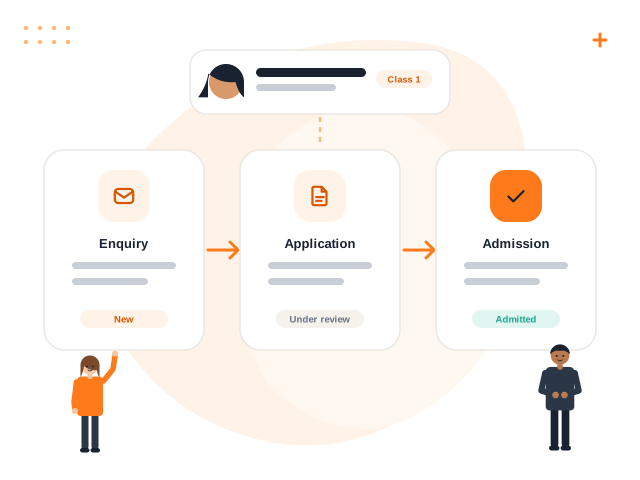
Most schools go through similar stages, even if the names differ.
- Enquiry. A parent asks about classes, fees or availability, by phone, in person or through the website.
- Application. The family fills in a form with the child's and guardians' details.
- Document collection. Birth certificate, previous school records, address proof and photographs are submitted.
- Assessment or interaction. Some schools hold a short assessment or a meeting.
- Decision. The school offers a seat, waitlists or declines.
- Confirmation. The family pays the admission fee and the student is formally enrolled.
Writing these stages down and agreeing on who owns each one is the most important step, before any software is chosen.
Where manual processes go wrong
- Lost enquiries. A name written on a pad is not followed up, and the family goes elsewhere.
- Retyping. Details from the application form are typed again into the student register, then again into the fee file.
- Missing documents. Nobody is sure which documents have been received for which child.
- Unclear status. Staff cannot say quickly how many applications are pending for Class 1.
What to record at each stage
| Stage | Useful information to capture |
|---|---|
| Enquiry | Parent name, contact, class sought, date, source of enquiry |
| Application | Child details, guardians, previous school, siblings in school |
| Documents | Checklist of required documents and what has been received |
| Decision | Outcome, date, reason for waitlist if applicable |
| Enrolment | Admission number, class, section, fee structure applied |
Capturing the enquiry source, such as a referral, a hoarding or the website, also helps the school understand where families hear about it, using real data from its own records.
Tip: Give every enquiry a follow-up date at the moment you record it. An enquiry without a next step is usually a lost enquiry.
Make the data flow forward
The biggest benefit of digital admissions is that the information entered at the beginning does not need to be typed again. Once a student is admitted, the same record should feed the class list, attendance, fee assignments and the parent portal. This reduces mistakes, such as a misspelt name appearing differently on a report card and a fee receipt.
Admission numbers should be generated in a consistent format. Decide the format, such as a year prefix followed by a running number, before the session starts, and avoid reusing numbers.
Communicate clearly with families
Parents are anxious during admissions. A few habits help:
- Publish the eligibility rules, required documents and key dates in one place.
- Acknowledge every application, even if the decision will take time.
- Give a realistic timeline, and update families if it changes.
- Be transparent about fees and other charges before the admission is confirmed.
- Keep a polite, consistent response for families who are waitlisted or declined.
Handle documents responsibly
Scanned documents contain sensitive personal information. Store them in a place with controlled access, restrict who may view them, and decide how long they are kept. Avoid sharing copies through personal phones or open chat groups.
Bulk imports and existing students
If you are moving from registers or spreadsheets to a digital system, you will need to bring in existing students too. Clean the data first: standardise class names, fix spellings and remove duplicates. Then import in a batch and review the result before relying on it. A system that shows errors row by row, instead of silently importing bad data, makes this much safer.
Measure what you can see
Once enquiries and applications are recorded, simple counts become available from your own data: how many enquiries are open, how many applications are waiting for documents, and how many seats remain in each class. These help the principal plan sections and staffing.
Volvoq supports student admission with guardian and class details, automatic admission numbers, bulk CSV import with row-by-row error checking, and archiving that preserves history. A separate enquiry-tracking workflow is not described here as available.
Bring this into your school with Volvoq
Volvoq is a school ERP for student records, attendance, fees, exams and parent portals. Book a demo to see how it could fit your school.
Book a Demo